Retyping
Every row is the same clicks: open the price list, add a line, pick the product, enter the price and the date, save. All the way down the sheet.
Process map · robot · proof of work
You do the task in your browser app, and Maptelo turns it into a process map and a step-by-step guide. Then it enters the next rows of your spreadsheet into the system and confirms each entry by reading the system back. When something doesn’t add up, it stops and asks a person.
New customer price
ceny-tydzien.xlsx → Odoo 18, test data
5 of 5 confirmed
| # | Price list | Product | Price | From | |
|---|---|---|---|---|---|
| 1 | Ceny C001 | 48212-B | 142.50 | 2028-01-15 | VERIFIEDwas already in the system |
| 2 | Ceny C003 | 70010-A | 13.90 | 2028-02-01 | VERIFIEDread back from the system |
| 3 | Ceny C002 | 51001-A | 48.20 | 2028-01-10 | VERIFIEDread back from the system |
| 4 | Ceny C002 | 48212-B | 139.00 | 2028-03-01 | VERIFIEDread back from the system |
| 5 | Ceny C003 | 51001-A | 50.40 | 2028-03-01 | VERIFIEDread back from the system |
Now: Click “Save manually” · step 8/8
The problem
Every week the same data goes from Excel into an app: new customer prices, orders, master data changes. Every row has to be retyped, then checked to make sure it really saved.
Every row is the same clicks: open the price list, add a line, pick the product, enter the price and the date, save. All the way down the sheet.
A “Saved” message is not proof. Someone has to open the system and make sure the price is really there.
An ordinary bot (RPA) gets lost when a screen is updated. Worse, it may click something else and nobody notices.
How it works
New customer prices go from a spreadsheet into a price list in Odoo. It works the same way in other browser apps.
You do the task as usual, in your browser app. Maptelo records the steps, the screens and which spreadsheet column each value came from. Two or three demonstrations are enough.
It records only when you switch it on. Passwords never go into a recording.
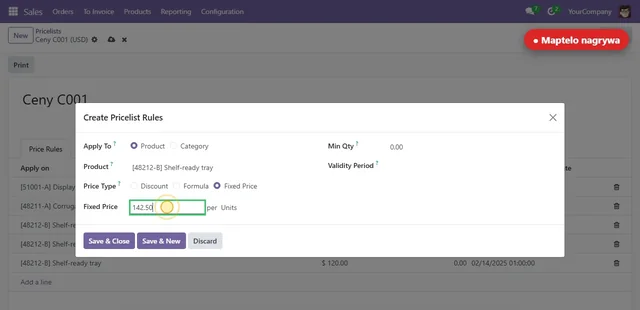
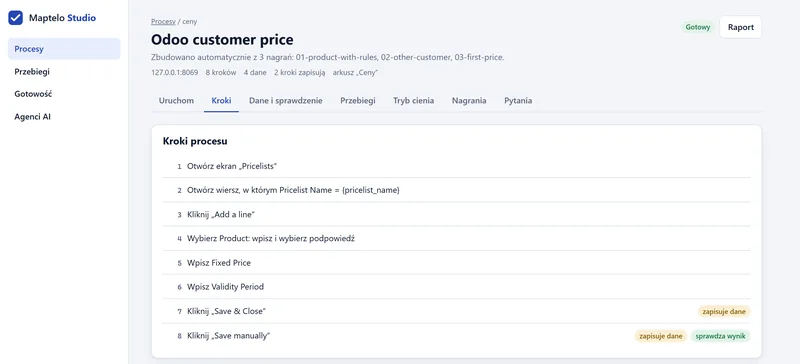
From the demonstrations Maptelo builds a process model: the steps, the data from the spreadsheet columns and how to check the result. You get a guide with screenshots and a process diagram.
Where the demonstrations differ, Maptelo asks instead of guessing.
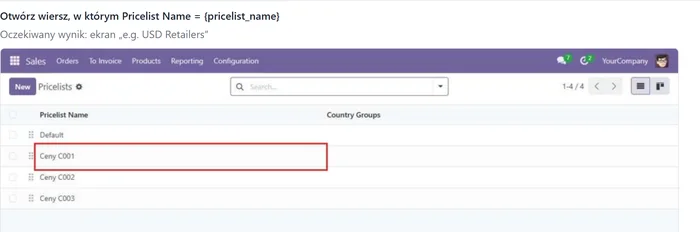
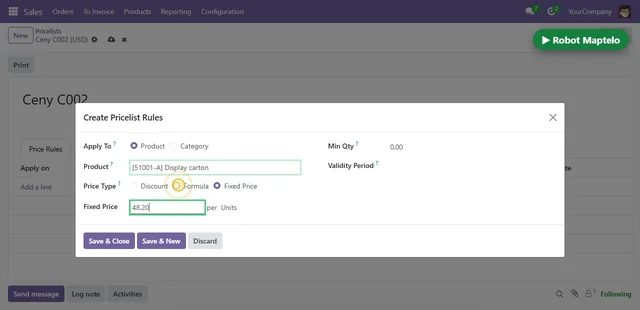
You pick a spreadsheet and the robot works through it row by row in the browser, signed in as you, the way a person would.
A dry run comes first: the robot stops before the first step that saves.
After every row Maptelo checks the system itself, independently of the screen, that the price really is in the price list. Only such a row gets VERIFIED.
The result goes back to the spreadsheet: a status and a note next to every row.
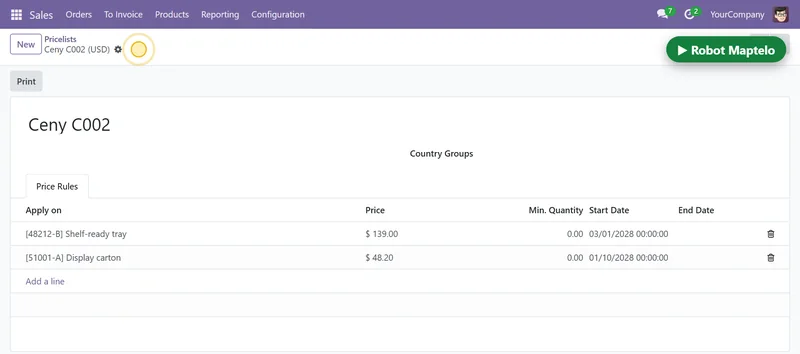
Read back from the system
Ceny C002 · 48212-B
expected 139.00 from 2028-03-01
read 139.00 from 2028-03-01matches
When a screen looks different or the data doesn’t add up, Maptelo doesn’t guess. It stops before saving and says what to check.
You accept the change with one click and the model learns the new look.
The button has new words
Step 7 “Save & Close” now reads “Save and close”. Maptelo recognised the button by what its form sends, but it won’t click it without your consent.
Nothing was saved.
Proof of work
A screen can mislead: a “Saved” message sometimes appears when nothing was saved. So after every row Maptelo reads the result straight from the system and compares it with what was supposed to change.
The read-back matches the spreadsheet. If the result was already in the system, Maptelo doesn’t write it a second time.
Maptelo wasn’t sure about the screen or the data. Nothing was saved, and the report says what to check.
Something was saved but the read-back doesn’t match, or the data breaks a rule of the process. The row waits for a person, with a note and a screenshot.
Proof of work
Row 4 of 5 · ceny-tydzien.xlsx
Test Odoo 18 with demo data · run of 7 October 2026
Example
A demonstration on test data: Odoo 18 Community with demo data
| Price list | Product | Price |
|---|---|---|
| Ceny C001 | 48212-B | 142.50 |
| Ceny C003 | 70010-A | 13.90 |
| Ceny C002 | 51001-A | 48.20 |
| Ceny C002 | 48212-B | 139.00 |
| Ceny C003 | 51001-A | 50.40 |
Five new prices: price list, product, price, valid from.
The same eight steps a person showed in Odoo.
The new price in the price list, confirmed by a database read.
| Product | Maptelo outcome |
|---|---|
| 48212-B | VERIFIED |
| 70010-A | VERIFIED |
| 51001-A | VERIFIED |
| 48212-B | VERIFIED |
| 51001-A | VERIFIED |
A copy of the spreadsheet with a status next to every row.
 The whole run on film →2:47 · Polish narration, English subtitles · from a demonstration to the results file
Control
Before the robot saves anything, you can see what it would do. And once it works, every step that changes something has its own safeguard.
The robot goes through the spreadsheet without saving. When people have finished their work, it compares every row with the system: it would have done the same, something different, or the row is still waiting.
| Spreadsheet row | In the system after people’s work | Robot |
|---|---|---|
| Ceny C001 · 51001-A · 46.90 | done as in the spreadsheet | same |
| Ceny C003 · 48212-B · 131.50 | a different price: 135.10 | different |
| Ceny C002 · 70010-A · 13.60 | not done yet | waiting |
Agreement: 1 of 2 compared rows. The difference: someone typed 135.10 instead of 131.50 from the spreadsheet. The robot saved nothing.
The robot goes through the whole process and stops before the first step that saves. Nothing reaches the system.
A different screen, two matching buttons, an unknown value: it stops before saving instead of guessing.
After an app update Maptelo finds the changed elements itself. It clicks a button that saves only once someone accepts it.
Approvals and four-eyes checks stay with people. The robot stops at that point.
A report, a screenshot from the end of the run and a status next to the row in the spreadsheet.
IT can limit the robot to a list of addresses and switch off AI help with a single policy file.
Runs locally. On the employee’s computer, in their browser, signed in as them. No server, no cloud and no telemetry. AI help is off by default.
Data & requirements →Who it’s for
Finance and operations first: wherever the same data goes from Excel into a browser app every week.
Price lists and customer prices, corrections, billing data.
Orders, status changes, delivery data, supplier portals.
New customers, products and suppliers, attribute changes in ERP and CRM.
Planned: Windows desktop programs and scheduled runs.
Pilot
The first pilots: one repetitive process, checked step by step before the robot saves anything. You talk directly to the person who builds Maptelo.
We pick one process: a spreadsheet and a browser app, repeated weekly or more often.
Someone who knows the process shows it two or three times in a test environment. A process map and a guide come out.
The robot works through a real spreadsheet without saving and compares its results with people’s work.
A report at the end: how many rows were confirmed, how many stops and why. You decide what happens next.