Download · Maptelo Lite 0.2.0

Download Maptelo Lite

The program is free and requires no registration. It runs on Windows 10 and 11 (64-bit) without administrator rights.

Installer

Recommended

Maptelo-Lite-Setup-0.2.0.exe53.1 MB

Lets you choose the installation folder (the Desktop by default) and writes nothing to system folders or the Windows registry. Uninstalling keeps your saved processes.

Download the installer (.exe)
SHA-256ecc1f1c468131c4004e84364c56020f69982f351eb2506927d55d4849694002f
Portable

Maptelo-Lite-portable-0.2.0.zip79.0 MB

Extract the archive anywhere, including a USB drive, and run Maptelo Lite.cmd. The portable version installs nothing: all files stay in its folder.

Download the zip
SHA-2561847698f3a1b077883e06ba383c139a280c2f798a81936e26fedb93c6fd971bb

Release 0.2.0, 27 October 2026Release notesAll versionsSHA256SUMS.txt

Installing

Installing, step by step

Installation takes a few minutes. Maptelo Lite is not code-signed yet, so Edge and Windows may ask you to confirm. The screenshots come from a clean Windows 11.

  1. Keep the downloaded file

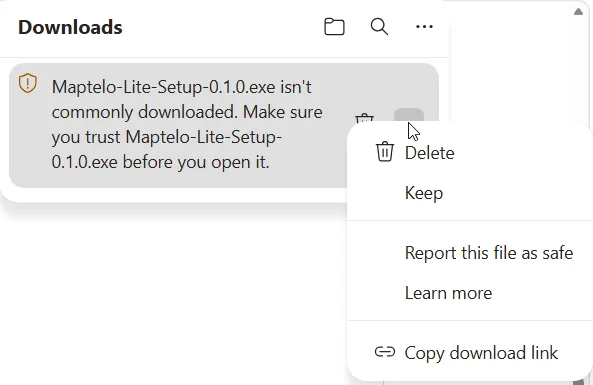
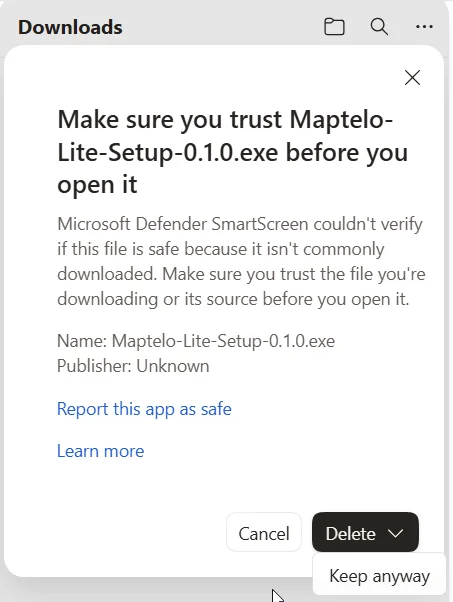
    Edge may report that the file “isn’t commonly downloaded”. Click “…” next to the file and choose “Keep”, then in the next window expand the arrow next to “Delete” and choose “Keep anyway”. Before running it, you can compare the file’s SHA-256 checksum with the one on this page.

    The Edge downloads panel: Maptelo-Lite-Setup isn’t commonly downloaded; the menu with KeepThe Edge “Make sure you trust…” window: the Delete button with an arrow, Keep anyway under it
    Edge on an English Windows 11, with the v0.1.0 installer.
  2. Run the installer

    Windows SmartScreen may display “Windows protected your PC”. Click “More info”, then “Run anyway”. The installer does not require administrator rights.

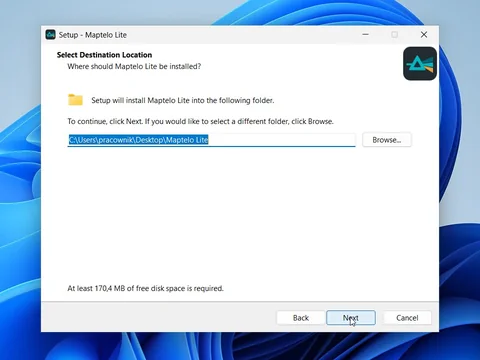
  3. Choose a folder

    The default folder is Desktop\Maptelo Lite. You can choose any folder you have write access to; it will hold the program, your processes and saved sign-in sessions.

    The Maptelo Lite installer: choosing a folder, C:\Users\…\Desktop\Maptelo Lite by default
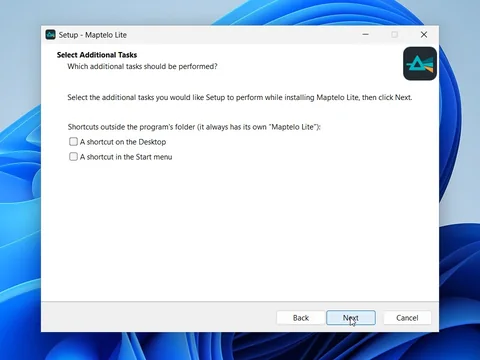
  4. Shortcuts (optional)

    The “Maptelo Lite” shortcut is always in the program’s folder. Desktop and Start menu shortcuts are optional.

    The Maptelo Lite installer: Desktop and Start menu shortcuts, unticked by default
  5. Start the program and check Readiness

    The Readiness tab checks what can be recorded on this computer: browsers, Java programs and the work folder. Then choose “New process”.

Requirements

Windows 10 or 11, 64-bit
Tested on a clean Windows 11 installation.
53.1 MB to download, 200 MB on disk
The program includes its own Python runtime (a 32-bit one too, for a 32-bit Java) and needs no additional components.
Microsoft Edge or Google Chrome
Recording runs in Edge, available on every Windows system, or in Chrome.
No administrator rights
An internet connection is needed only to download the program and for the application being recorded.
Java programs: the Java Access Bridge
Enabled with jabswitch -enable or by IT; the Readiness tab shows its status. Works with 64-bit and 32-bit Java, including a computer with only a 32-bit Java 7 or 8.

Check the downloaded file

The SHA-256 checksum confirms that the downloaded file is identical to the one GitHub built from the code in the repository. In PowerShell, in the file’s folder:

Get-FileHash .\Maptelo-Lite-Setup-0.2.0.exe -Algorithm SHA256

The result should match the checksum shown next to the file above and in the release’s SHA256SUMS.txt.

Uninstalling

Run “Uninstall Maptelo Lite” in the program’s folder. The program is removed and the folder with your processes is kept. You can also delete the whole program folder: Maptelo Lite leaves no files elsewhere in Windows.

Source code

Maptelo Lite is licensed under Apache-2.0. The code, bug reports and pull requests are on GitHub. Running it from source requires Python 3.12:

pip install ".[studio]"
maptelo-lite

github.com/krapcys1-maker/maptelo-lite

See how it works first

A film: recording a process in a Java program and in a browser, and the finished map and instruction. The page also compares Lite with the full Maptelo.

Maptelo Lite: the film and details