Browser applications
ERP and CRM systems, portals, internal applications. Recording takes place in Microsoft Edge, available on every Windows system, or in Google Chrome. The user signs in; the session can be kept in a separate browser profile.
Maptelo Lite · free and open source
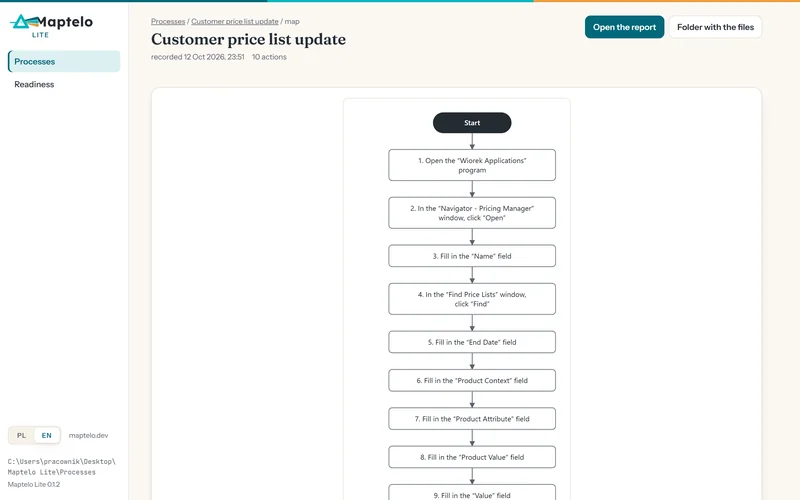
Maptelo Lite records a process performed in a browser or a Java program and produces a step-by-step instruction with screenshots, a process diagram, a BPMN model and a report. It runs locally and uses no AI.
Chapters2:02
How it works
Enter the process name and the application’s address, or choose a Java program, then start recording. Optionally, select the spreadsheet the data comes from.
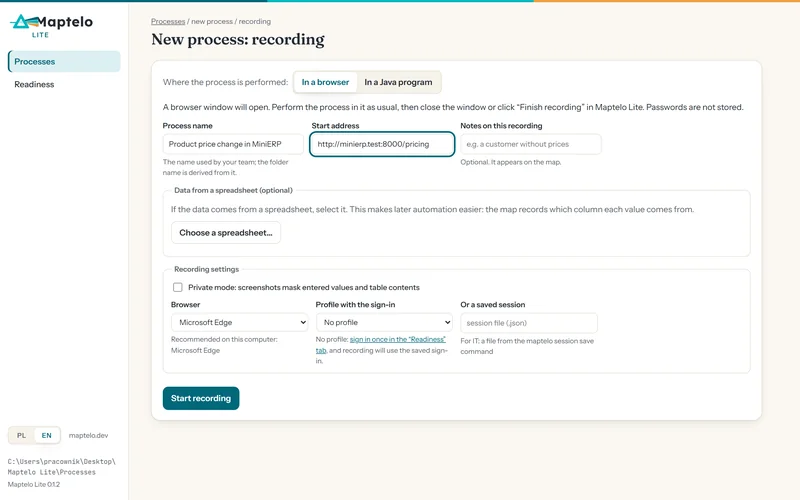
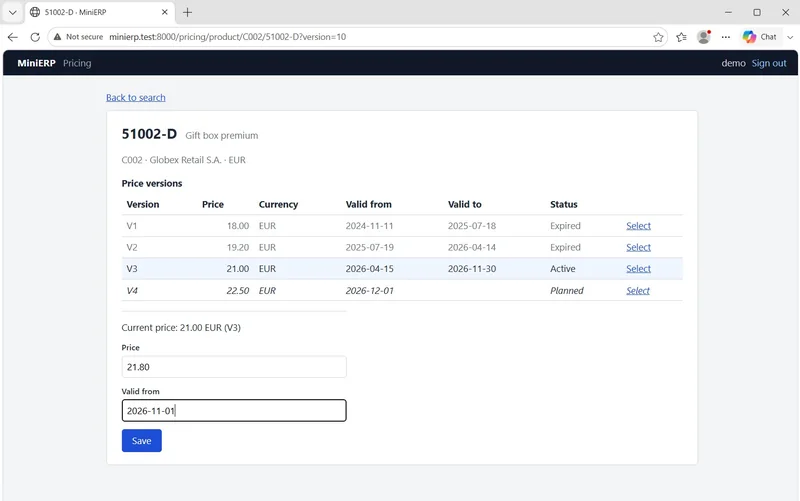
The process is performed as usual: signing in, searching, selecting a record, entering data, saving. Maptelo Lite records every step together with a screenshot, and each step can be given at once its purpose, when it is done and whether a person decides there. Passwords are not stored.
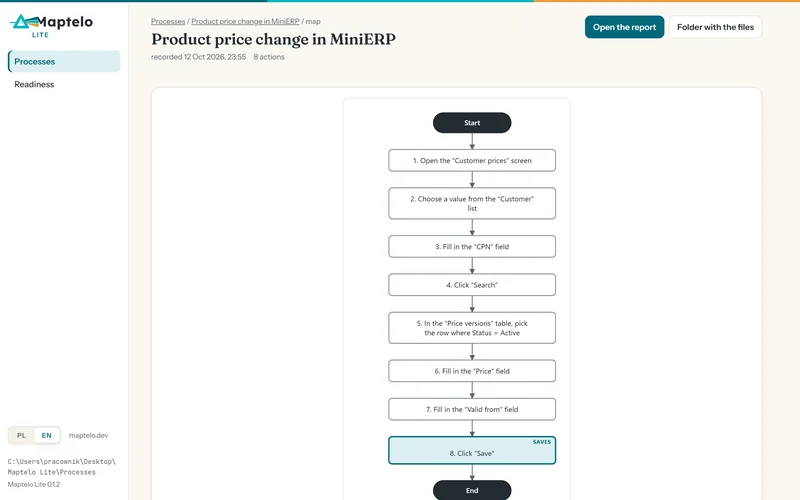
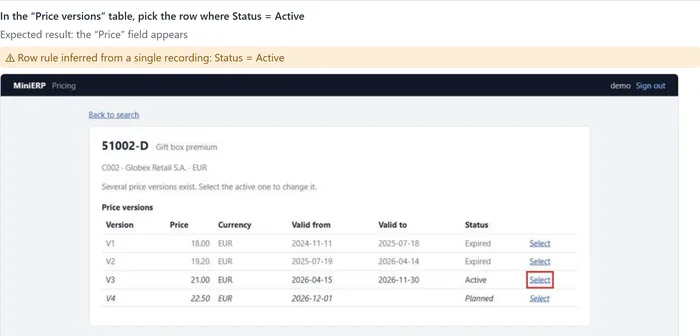
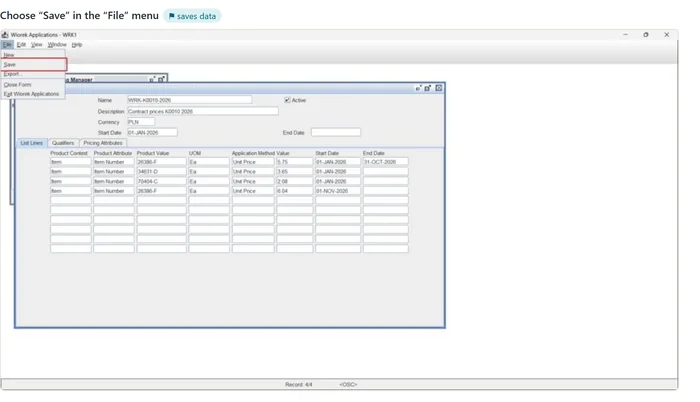
When the recording ends, the map is ready: a description of every step, the process diagram and an instruction with screenshots. The step that saves data is marked, and rules inferred from a single recording, such as the criterion for choosing a table row, are flagged for review. The process card adds what a recording cannot show: the process in your own words, its goal, the source of the data and its rules.
Output
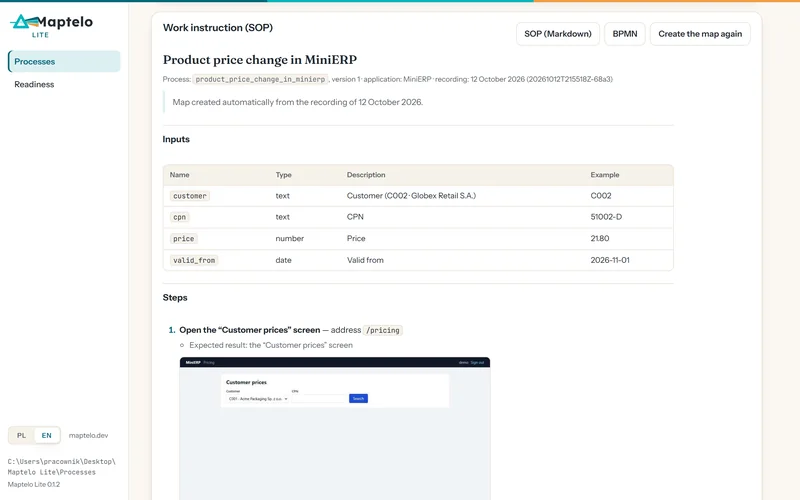
Each recording produces a full set of files in the map folder, in the chosen language: English or Polish.
sop.mdInputs, steps, expected results and a screenshot of every step with the element marked.
report.htmlThe complete documentation in a single file, ready to share or archive.
process.svg · .mmdAn image for documents and the same diagram in Mermaid format.
process.bpmnFor import into process modelling tools.
model.yamlAn open Maptelo description, the basis for possible automation.
ai-brief.mdA description of the process for your own AI assistant to build an automation from. Maptelo Lite itself uses no AI.
If the data comes from a spreadsheet, it can be selected before recording. The map then records which column each value comes from.
Supported applications
ERP and CRM systems, portals, internal applications. Recording takes place in Microsoft Edge, available on every Windows system, or in Google Chrome. The user signs in; the session can be kept in a separate browser profile.
Java desktop programs (Swing, AWT) are read through the Java Access Bridge, the mechanism screen readers use, including programs that bring their own Java runtime. The bridge is enabled with jabswitch -enable or by IT, and the Readiness tab shows its status. It was also tested on a test program built like Oracle Forms (lists of values, query mode, Polish dates, a file dialog). Since version 0.2.0 the recorder keeps every action also in a large form: a block of rows longer than its window, fields with a “…” button, windows the form opens. Oracle Forms itself is not confirmed yet. Since version 0.1.5 the recorder asks the program far fewer questions, does not read minimized windows and logs the recording’s load: numbers only, no screen content.
Privacy
Recordings and maps are saved in the Maptelo Lite folder. The program connects to no server and opens only the application being recorded.
Neither in the recording nor in the documentation.
Masks entered values and table contents on screenshots; the map keeps no values as examples.
The program requires no registration and sends no data to AI models or to the vendor.
The program’s behaviour can be verified: the code is on GitHub under the Apache-2.0 licence.
The program window runs at 127.0.0.1 and accepts only requests carrying a key generated at each start.
Maptelo Lite and Maptelo
Maptelo Lite is the open part of Maptelo. When a documented process should run automatically, with data from a spreadsheet and every entry confirmed in the system, that is the full Maptelo.
| Maptelo Lite | Maptelo | |
|---|---|---|
| Recording a process in the browser | yes | yes |
| Instruction (SOP), diagram, BPMN, report | yes | yes |
| Step descriptions and the process card | yes | yes |
| AI brief (a file for your own AI assistant) | yes | yes |
| Recording a process in a Java program | yes | yes |
| A model from several recordings: variable and fixed elements | – | yes |
| Automatic execution for every spreadsheet row | – | yes |
| Every entry confirmed by reading the system back (VERIFIED) | – | yes |
| Shadow mode and AI agent integration (MCP) | – | yes |
| Licence | free, Apache-2.0 | pilot |
Version 0.2.0 for Windows 10 and 11: the installer (53.1 MB) or the portable version. Free, no registration.
The program is not code-signed yet, so Edge may ask you to confirm the download. Details on the download page.